Summary
Updates
Update — v2.5.8.285 (June 2026)
This is a maintenance update to the v2.5.8 release, focused on bug fixes, performance, and a smoother install experience. The most notable changes:
- Faster on Windows and Web — switched to the mimalloc allocator, speeding up memory‑heavy operations such as Boolean.
- New Windows installer (.exe) — a localized, one‑click setup alongside the existing MSI package.
- macOS fixes — corrected window shadow rendering, fixed
meshinspector://sign‑in, and removed the unnecessary re‑authentication prompt when opening files from Finder. - New tools & options — a “Register Whole Objects” registration mode, Zivid scanner support, and improvements to Geodesic Path / Points‑to‑Lines and the Brush plugin.
- Stability — fixed offline‑cache invalidation, the Delete Selection shortcut, and expanded interface localization.
We recommend updating — it’s a drop‑in upgrade that makes MeshInspector faster and more stable, with no workflow changes required.
Highlights
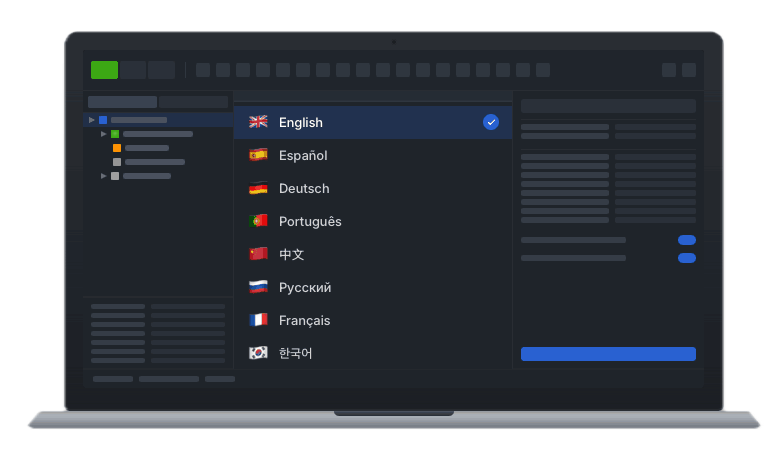
MeshInspector is now fully translatable — the entire interface, including dialog titles, action names, and auxiliary widgets, can be localized, with a language picker available right from the Quick Setup window on first launch.
This release also adds MCP support, letting AI tools like Claude Code drive MeshInspector directly: open files, run tools, capture screenshots, and even write and execute Python code inside the application. Install the MCP integration →
Updates
Localization
- The UI is now translatable end-to-end — dialog titles, action names, and auxiliary widgets all go through the localization system.
- Language selector in the Quick Setup window. Pick the interface language during first launch — no need to dig through preferences.
- Expanded translations across previously untranslated panels and tools.
- Authentication window translation handling fixed.
AI / MCP Integration
- MCP gateway is shipped with the application, built in and included in the macOS bundle out of the box.
- Python from MCP. AI agents can now write and run Python code directly inside MeshInspector, gated by the Python plugin’s access check.
- Screenshots and shutdown over MCP —
viewer.captureScreenshotandviewer.shutdownwork even while signed out, so agents can capture results without an active session. - MCP tool validator runs at install time and gates AI-driven actions for signed-out users.
Mesh Healing & Repair
- Self Intersections repair gains new mimic options in the Advanced section, helping preserve the original surface character during repair.
- Reduce Total Angle option added to RebuildMesh, Make Delone, MeshHealer (on by default), and Offset — produces cleaner triangulations on flat areas.
- Make Delone: more granular control over the remeshing pass.
Selection
- Partitioner — a new tool for mesh segmentation. Splits a mesh into meaningful regions and color-codes each segment for instant visual feedback. Boundary edge type is toggled with icon buttons for a faster setup.
- Select Boundary Edges/Faces is now disabled automatically when the mesh has no holes — no more clicking a tool that has nothing to do.
- Select Component updates correctly when the edge selection changes, and the component visualization has been refreshed.
- Screen lasso auto-closes the polygon more intuitively at the end of a stroke.
Mesh Editing
- Section: when you re-enter the tool with the same objects still in the scene, the previous cutting plane is restored.
- Brush: new
mimicPatchoption for finer control over patched regions. - Create Primitive: torus radius is clamped to a safe range to prevent edge-case asserts.
Object Transformation
- Transform multiple selected objects at once. Object Transformation now respects multi-selection, so you can move, rotate, or scale a group of objects together in one operation.
UI/UX
- Quick Start window layout fix on smaller screens.
- Welcome window loads faster: decorative primitive icons no longer go through the test engine.