Updates
January, 27th 2026 – 2.5.6.175 Release includes Bug Fixes.
Highlights
- New Toolpath, Lines, and Distance Maps tabs make manufacturing and analysis workflows easier to find and faster to use.
- Toolpath & Manufacturing adds CNC setup, 3-axis toolpath generation, swept volume validation, and G-code visualization.
- New Linux application distributive now available for download starting with this release (Ubuntu 20 support deprecated).
- Multi-window UI (Windows only) with detachable panels for multi-monitor workflows.
- Improved transparency rendering in the Web app and on macOS via Depth Peeling.
- Experimental Nesting tool for tight packing multiple objects into a box.
- Faster Section tool for very large point clouds.
UI/UX
- Multi-window application (Windows only). Detach tool panels and auxiliary windows from the main window (e.g., to another monitor) to free up 3D viewport space. The legacy single-window mode can be restored in Settings.
- New dedicated tabs. Toolpath, Lines, and Distance Maps are now exposed as top-level tabs in the main toolbar.
- Order-independent transparency on Web and macOS. Implemented Depth Peeling for accurate transparency rendering (previously correct transparency was available only on Windows and Linux).
- Chinese characters on Web app. Added support for Chinese text rendering in the Web version.
- Drag-and-drop folder open. Dragging folders into the app is now supported (except Web).
- Additional improvements. Numerous UI/UX refinements and stability fixes.
Toolpath & Manufacturing
- New Toolpath tab. CNC and manufacturing workflows are now available in a dedicated tab.
- CNC machine configuration. Set up rotation axes, axis order, limits, feedrates, and home positions via the CNC Machine Settings panel.
- 3-axis toolpath generation. Generate toolpaths with configurable tool diameter, voxel size, step-over, safe Z, bypass direction, and interpolation.
- Swept Volume analysis. Compute and visualize swept volumes to validate machining results and identify potential collisions.
- G-code workflows. Visualize G-code and convert it into editable geometric representations.
Lines and Distance Maps
MeshInspector now exposes Lines and Distance Maps as dedicated tabs for workflows where curve geometry and distance fields are core building blocks, not side utilities.
The Lines tab supports paths, contours, measurement curves, and toolpath-like data—making it easier to inspect, clean, edit, and convert lines into meshes, points, voxels, or distance maps for downstream processing.
The Distance Maps tab streamlines inspection, comparison, and manufacturing use cases by enabling distance field creation and editing, isoline extraction, conversion to meshes or images, and boolean/refinement operations—turning distance maps into a practical intermediate representation for real production tasks.
Inspection and Measurements
- Feature creation via point picking. Features can now be created by picking key points (e.g., point features or sub-features such as a circle center or cone apex), in addition to existing creation methods.
Meshes
- Text on Mesh. Text now follows the surface path while respecting mesh normals for each letter.
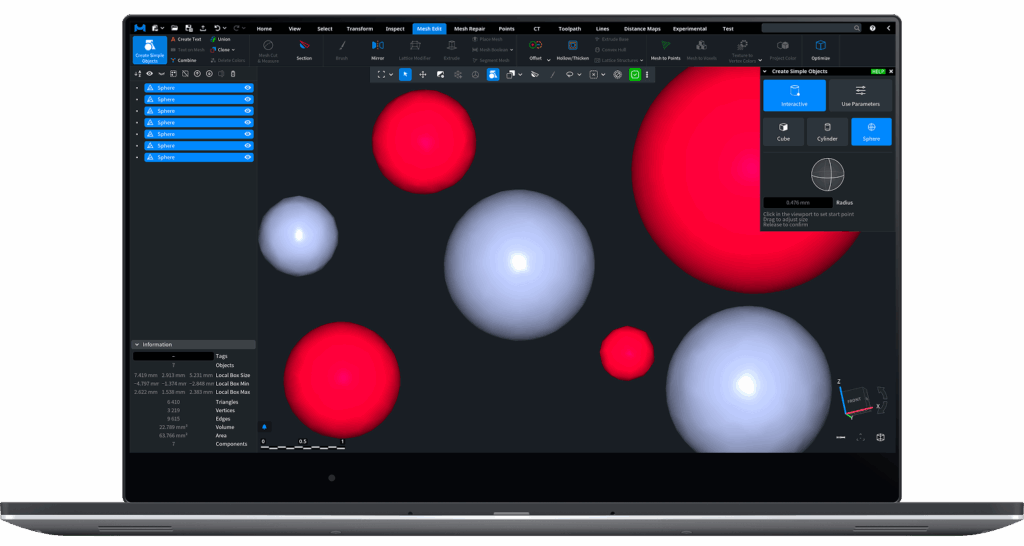
- Create Simple Object tool. Added an interactive creation mode — create simple objects by clicking points in the 3D view and dragging.
- Offset tool. Added support for processing multiple meshes in a single operation.
Point Clouds
- Section tool performance. Optimized for very large point clouds.
3D Printing
- Nesting (Settings → Application → Show experimental features). Experimental tool for tightly fitting multiple objects inside a box.
Save / Load
- PLY. Added support for textures and per-triangle colors.
- OBJ. Improved loading performance for large files, especially in the Web version.
Platform Support
- Linux distribution options. MeshInspector now ships a Linux application distributive in addition to the existing Linux builds, provided both as Ubuntu installers and as a portable AppImage.
- AppImage (portable build). AppImage packages MeshInspector and its dependencies into a single executable file, allowing it to run on most Linux distributions without traditional installation or root access. It is self-contained (typically mounted via FUSE) and can be removed by deleting the file. Optional tools such as AppImageLaunchercan integrate AppImages into the desktop environment.
- Support for Ubuntu 20 has been deprecated.