Summary
Updates
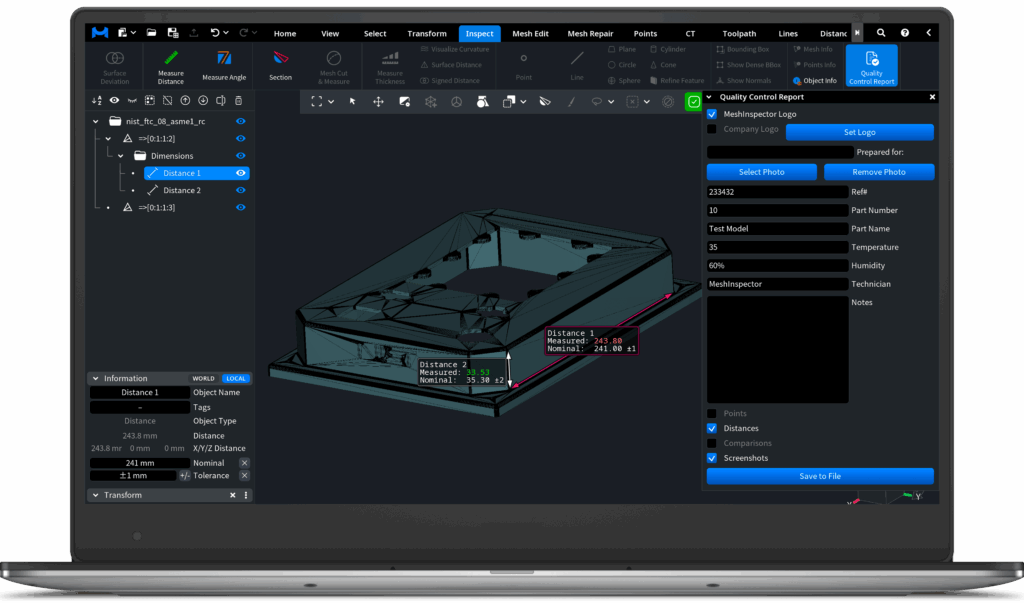
Release v2.5.7.147 from March 24th 2026 introduces various small bug fixes & improvements.
UI/UX
- Add World/Local toggle in Information pane that works for single objects and groups.
- Use different colors for XYZ labels of bounding box in 3D view.
- Shortcuts for Expand & Shrink added.
- Numerous other stability and UI/UX improvements.
Inspection and Measurements
- Expose QC Report tool to Inspect tab.
- Picked points can be moved now is Measure tools.
- Changing Measurement type adds existing preview to scene and starts new measurement.
- Snap to Edge option added to Measurement tools.
- Section tool supports now Import Plane with plane’s label click.
Meshes
- Editing mesh with Brush tool is more responsive now.
- Tools with internal usage of voxel representation, e.g. Fusion, Offset, Rebuild Mesh were accelerated.
- Offset and Extrude Base tools permit selection of the resolution.
- Fix Tunnels and Mesh Healer now can find much shorter tunnel loops than in the previous versions. Advanced options were added about what kind of loops to prefer.
- Movement Body tool improved, e.g. several trajectory options.
- Mesh Cut & Measure tool improved, e.g. Import and Export of Control Points.
- Subdivide tool improved: new Curvature Priority setting for finer mesh in curved areas.
- Select Not Smooth Triangles tool added.
Save/Load
- SVG files are imported as lines now.
- Reading from all text formats supports BOM (Unicode) prefix now.
- Reading of ASCII STL format is greatly accelerated.
- Support comments and headers in CSV file format.