Updates
Release 2.6.0 is about scans and edges. Registration now finds the starting position of a scan on its own: as long as two scans overlap, Auto Initial aligns them from wherever they were loaded, with no point pairs to pick. Several tools learn to work along selected edges and creases, so a scanned part can be smoothed while its boundaries stay sharp, cut around a feature line or refined only where the detail is. Mesh Boolean can swap its objects and explains why an operation failed, and both Boolean operations and Simplify run faster. More file formats open and save, and macOS moves to a drag-and-drop .dmg.
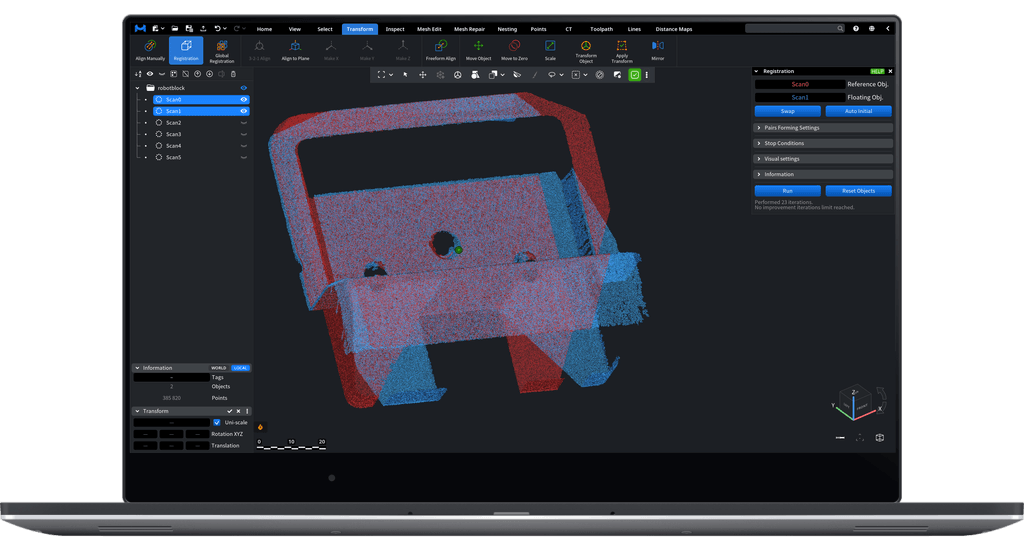
Registration: align scans from any starting position
Auto Initial in the Registration tool now finds the starting position by itself. As long as two scans overlap, it brings one onto the other from wherever it was loaded, with no rough manual placement and no point pairs to pick. Fine alignment then takes it from there, as before.
It looks for matching shapes on both scans and keeps the position where they overlap the most, so it holds up even on partial scans that share only a small area. The search runs in the background and can be cancelled.
It needs normals: meshes have them, and Make Normals adds them to point clouds. Point clouds without normals keep the previous estimate.
Edges and creases as a guide
Scanned mechanical parts come out with soft, noisy edges. Several tools now take selected edges and creases as their guide, so the surface can be cleaned while the boundaries between faces stay crisp:
- Partitioner gains Smooth Segments, Sharpen Boundaries. It denoises the surface inside each segment, keeps the segment boundaries sharp and marks them as creases, without changing the topology. With triangles selected, Smooth Segments and Reduce Noise work only inside the selection.
- Cut Around Selected Edges, new on the Mesh Edit tab, cuts the mesh at a set distance around each connected group of selected edges, keeps the regions of different groups apart, and selects them for the next step.
- Select Region Boundary, new in the Select Primitives list, turns a triangle selection into the edges that bound it, so a selected region can drive the edge based tools.
- Subdivide can refine only near selected edges, creases and colour boundaries, putting new triangles where the detail is instead of across the whole mesh.
- Brush can keep selected edges and creases sharp while it smooths, and remembers all its settings between launches.
Mesh Boolean: easier to set up, easier to fix
A new Swap button exchanges objects A and B, so a difference can be turned around without picking the objects again. When an operation fails because of the geometry, the message now lists the usual causes, such as self-intersections, holes, inconsistent normals and degenerate triangles, and keeps the specific reason below them, so you know which mesh to repair. Two meshes that only touch no longer lose one of them in the result, and Boolean operations run much faster.
Files
- Google Draco: .drc meshes and point clouds open and save, and Draco-compressed glTF files open too
- LAS and LAZ: point clouds can now be saved in these formats, with colours and normals
- G-code objects can be saved back to .gcode, .nc or .txt files
- Binary OFF files open alongside text ones
- STEP: the import settings are in Settings, with a new Force Load Sub-Shapes option that splits a single-body part into its sub-shapes
- OBJ: when the material file or the textures are missing, MeshInspector says so and keeps everything that did load
- ZIP archives and folders made on a Mac open without the extra __MACOSX entries and .DS_Store files
- DICOM: Enhanced CT slices without functional groups load with the right spacing and position
- TIFF and GeoTIFF: files with non-Latin characters in their paths open on Windows, no-data pixels stay empty in distance maps, and GeoTIFF rasters land at the right coordinates
Viewing and navigation
- Shortcuts can have several keys: Ctrl+Y now redoes, and Space plus a digit switches to the standard views on keyboards without a numpad
- A click on the view cube turns the camera smoothly; the animation can be switched off in Settings
- The mouse wheel zooms more smoothly and can be inverted, and on macOS the wheel now zooms the same way as on Windows and Linux, whatever the Natural scrolling setting
- A new display option culls the back faces of a mesh, and opaque objects keep clean edges in front of transparent ones
- Tool windows can be placed over the ribbon and the scene list, and one popup no longer closes another
- The splash screen can be switched off in the Viewer settings
- In the scene tree, Shift-click selects a range inside groups too
Other small things, useful in particular situations
- Create Simple Objects, where a Rotation field turns the new primitive around X, Y and Z before it is created
- Lattice Modifier, whose Ignore Selection option deforms the whole mesh even when part of it is selected
- Extrusion Body, with a Fix Self-Intersections option that cleans the swept body and keeps hollow profiles and enclosed voids
- Mesh Healer, where Small Tunnels finds tunnels with its default settings, as the maximum tunnel length now follows the tolerance
- Selection to Object, which takes the place of Clone Selection in the Clone list
- Transform Object, which moves the children of rotated parents in the right direction
- Union, which reports the real reason when uniting components fails
- Measure Distance and Measure Points, which fit point coordinates in their cells, and Signed Distance, whose labels use your units
- Quality Control Report, which prints a neutral title when Ref# is empty and skips blank rows
- MCP, where AI agents wait for the saved sign-in right after launch instead of failing, and get tools for the camera, the viewport background and object statistics
- Simplify, where Parallel Algorithm is now on by default, so large meshes are simplified much faster
Platforms
macOS now installs from a drag-and-drop .dmg instead of a .pkg, shows a splash screen while it starts, and uses Python 3.12 by default. On Windows, the program and its libraries are code-signed, and the MSI installer is 11 percent smaller. The Linux AppImage ships the Python standard library for scripting. The web version opens models straight from a link that carries their addresses, and downloads less on start thanks to Brotli compression.
