MeshInspector can collect data about the tools you use, to help the team improve the app. This is optional: you can turn it off at any time in the settings, and an administrator can turn it off for an installation with a command-line flag.
The “We'd Like to Improve Your Experience” dialog
The first time you start MeshInspector, it shows a dialog with the heading We'd Like to Improve Your Experience and this text:
To help us understand how you use MeshInspector and make it better, we'll collect data on the tools you click on. This will give us insights to improve functionality and usability.
No personal info or file data is collected, and you can opt out anytime in the settings.
The dialog has two buttons:
- Ok — keep usage statistics on;
- Manage Settings — open Settings on the Application tab, where you can turn them off.
After you answer, the dialog does not appear again.
Turn usage statistics off or on
- Click Home › Settings (or press Ctrl+,, Cmd+, on macOS).
- Open the Application tab.
- Under Behavior, clear Collect Usage Statistics. Select it again to turn usage statistics back on.
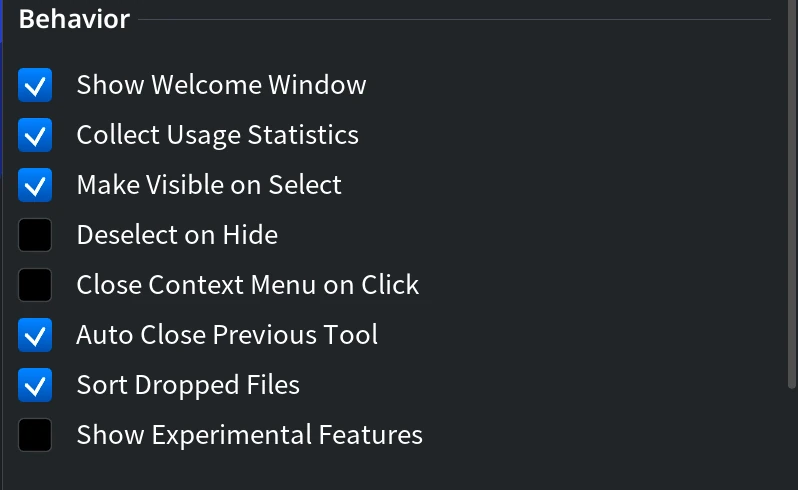
The change takes effect at once; you do not need to restart the app. When you hover over the checkbox, the app shows this tooltip: “Allow application to collect (non-personal) data about tools that are used to improve performance.”
What is collected
The MeshInspector Privacy Policy describes this collection in the section Optional Product Usage Statistics. According to it, the usage statistics may include:
- which MeshInspector tools or features you use;
- how often you use them;
- the email address of your MeshInspector account, for license association and account management.
The same section says that project files, geometry data, CAD file contents and the contents of the files you edit are not included. For questions about your data, use the contacts listed in the Privacy Policy.
Turn off usage statistics for an installation (-noTelemetry)
If you deploy MeshInspector for a team, start it with the -noTelemetry command-line flag. In a session started
this way the app does not show the dialog, does not show the Collect Usage Statistics checkbox in Settings and
does not send usage statistics, whatever the checkbox was set to before.
On Windows, add the flag after the path to the app in the Target field of the shortcut, or in the script that starts it:
"C:\Program Files\MeshInspector\MeshInspector\MeshInspector.exe" -noTelemetry
On macOS, start the app from Terminal:
/Applications/MeshInspector.app/Contents/MacOS/MeshInspector -noTelemetry
The flag works only for the session it starts, so use it every time you launch MeshInspector, for example in the shortcut that people use.


