
Slicestack Diagnostics checks the slices of a 3MF slice stack, for example the file written by Export 3mf Slicestack of the Nesting tool. In every slice it counts the points where contours cross and the zones with a wrong winding, that is, reversed or overlapping contours. A printer builds each layer from these contours, so a slice with such issues may print wrong. Slicestack Diagnostics is available on every plan.
Where to find it
Nesting tab › Slicestack Diagnostics. The tool does not need any objects in the scene: it reads the file directly.
How to check a file
- Click Nesting › Slicestack Diagnostics. A file dialog opens; later you can open another file with Open File....
- Choose a 3MF file (.3mf or .model). If the file has no slice stacks, the app says that no slicestacks were found.
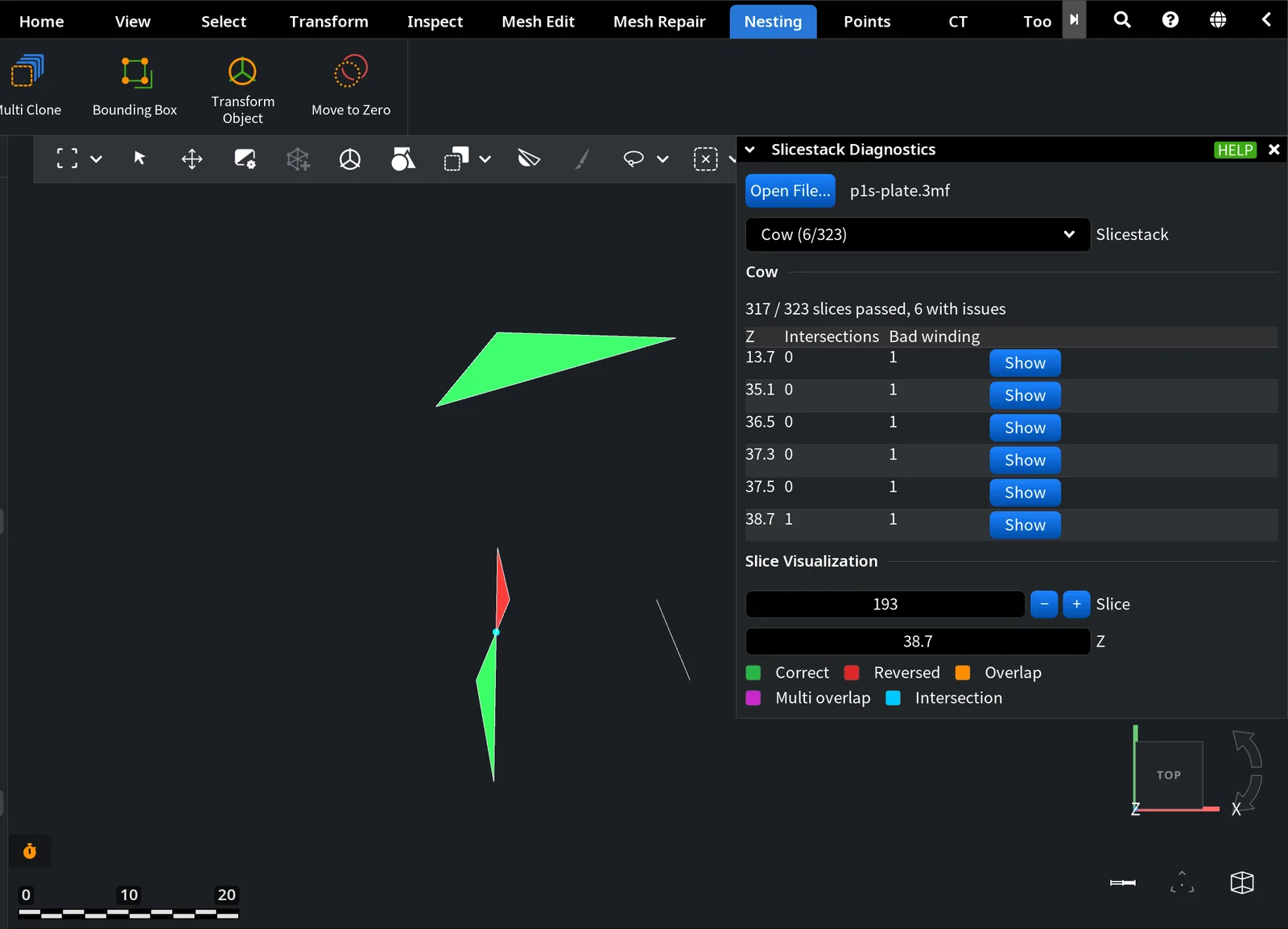
- If the file has several slice stacks, one per part, pick one in Slicestack. Each entry shows the name of the part and the number of slices with issues out of all its slices, for example Cow (6/323).
- Read the summary under the name of the part: All 201 slices passed, or for example 317 / 323 slices passed, 6 with issues.
- The table lists only the slices with issues: their Z, the number of Intersections and the number of zones with Bad winding. Click Show in a row to see that slice in the viewport.
Slice Visualization
Under the table, Slice is the number of the slice shown in the viewport and Z is its height. Type a height in Z to jump to the nearest slice. The tool opens on the first slice with issues. The colors of the zones:
| Color | Meaning |
|---|---|
| Correct (green) | The inside of exactly one contour, as it should be. |
| Reversed (red) | A zone of a contour that runs the wrong way. |
| Overlap (orange) | A zone covered by two contours. |
| Multi overlap (magenta) | A zone covered by three or more contours. |
| Intersection (cyan) | A point where contours cross. |
Result
A slice passes when it has no intersections and no zones with a wrong winding. If a part has slices with issues, repair its mesh, nest and export it again, and check the new file. In the nesting example of this section, the parts with closed, clean meshes passed every slice, while three models with holes in their meshes had slices with issues: see From Parts to a Print-Ready Build Plate.


