
To ask a question, report a bug or suggest an improvement, use Feedback on the Home tab of MeshInspector.
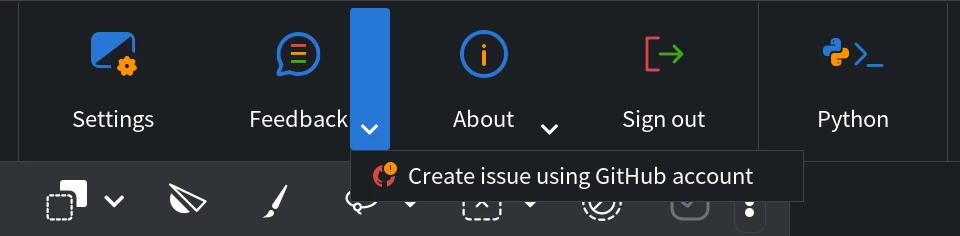
Ways to reach the team
| Channel | Where to find it | What it is for |
|---|---|---|
| Contact form | Home › Feedback opens the Contact us page in your browser. | Questions, bug reports, suggestions and sales requests, such as Enterprise licenses. |
| GitHub issue | Home › Feedback ▾ › Create issue using GitHub account opens a new issue in the MeshInspector repository. | Bug reports and ideas that everyone can read. You need a GitHub account. |
| support@meshinspector.com, also a link in Home › About. | Problems with the app, your account or your plan, especially when you attach a log or a file. |
Issues on GitHub are public. Do not post confidential models, logs or your email address there: send them to support@meshinspector.com instead. Before you create an issue, check the existing issues: someone may have reported the same problem.
What to include in a bug report
- What happened: the steps you took, what you expected and what the app did instead.
- A screenshot of the problem or of the error message (see in-app screenshots).
- The log file of the session with the problem: Home › About ▾ › Open Log (see how to access log files).
- System Information: click Home › About, then System Information, click Copy to Clipboard and paste the text into your message. It has the version of the app, your operating system, the processor, the graphics card and the memory.
- A sample file that shows the problem, if you can share it.
For a question about your account or your plan, write from the email address of your MeshInspector account or name it in the message: support finds your account by it.
The Professional plan includes priority support (see the pricing page).


