A feature object is an exact geometric shape: a point, a line, a plane, a circle, a sphere, a cylinder or a cone. You fit it to a mesh or a point cloud to read a center, an axis, a normal or a diameter. A feature has no triangles or points of its own: it is defined by a few values, such as a center, a direction and a radius.
A measurement object keeps a distance, an angle or a diameter that you measured, so it stays in the scene next to the part.
Feature objects are characterized by:
- An ideal shape, not a surface made of triangles.
- A few parameters that define the shape completely.
- A name tag in the viewport; circles, spheres and cylinders also show their diameter.
Feature objects in MeshInspector
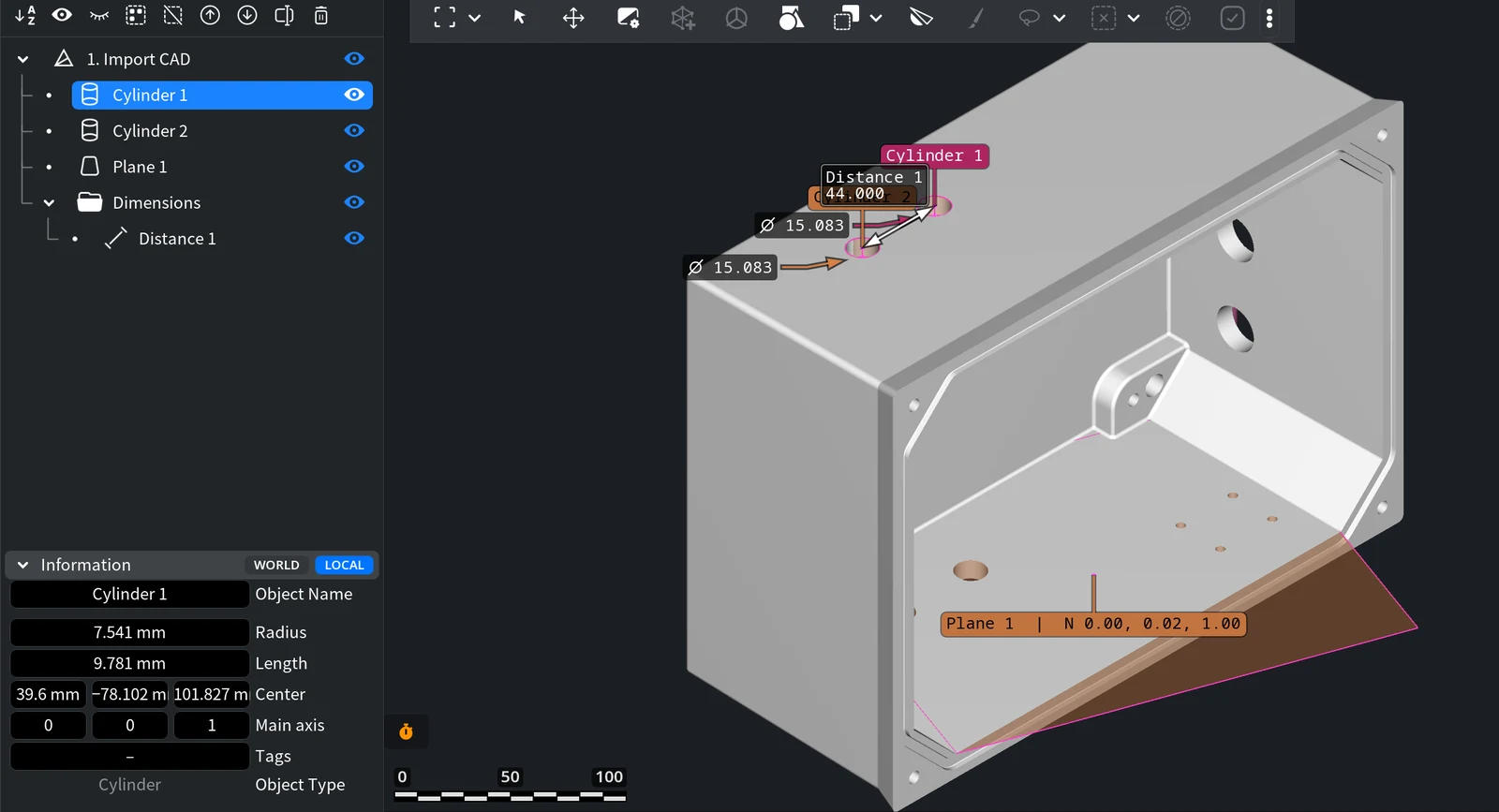
A new feature appears in the Scene tree as a child of the object it was fitted to, named by its type and number: Cylinder 1, Plane 1. Its icon shows the shape. In the viewport, a plane is drawn as a transparent rectangle with its normal on the name tag, and a cylinder fitted to a hole shows its diameter.
| Object type | Defined by (Information rows) | Made by |
|---|---|---|
| Point | Point | Inspect › Point |
| Line | Center, Direction, Length | Inspect › Line |
| Plane | Center, Normal, Size, SizeX, SizeY | Inspect › Plane |
| Circle | Radius, Center, Normal | Inspect › Circle |
| Sphere | Radius, Center | Inspect › Sphere |
| Cylinder | Radius, Length, Center, Main axis | Inspect › Cylinder |
| Cone | Angle, Height, Center, Main axis | Inspect › Cone |
The cube, cylinder or sphere made by Mesh Edit › Create Simple Objects is different: it is an ordinary mesh made of triangles, see Meshes.
Create feature objects
- Inspect › Point, Line, Plane, Circle, Sphere, Cylinder and Cone (the Create group) fit a feature to picked points, a selected area or a hole boundary: How to Create and Measure Features, Point and Line, Sphere and Cone.
- Inspect › Refine Feature fits an existing feature again to its mesh or point cloud: Refine Feature.
- Which tool fits which task: Inspect & Measure Basics.
What you can do with a feature object
- Select, hide, rename, remove. Work with it in the Scene tree like with any other object: the eye icon hides it, Object Name in Information renames it, and Remove in its right-click menu deletes it.
- Read and change its values. Information shows the values that define the feature, for a cylinder Radius, Length, Center and Main axis, and Object Type. You can change the values right in the panel. A feature has no Transform panel.
- Measure with it. Click a feature in Inspect › Measure Distance or Measure Angle, for example to measure between the axes of two holes.
- Align by it. Transform › 3-2-1 Align, Align to Plane and Make X, Make Y, Make Z use features to place the part, see Orient a Model by Features.
When you move the parent object, its features and measurements move with it.
Measurement objects
| Object | Made by | Information shows |
|---|---|---|
| Distance | Inspect › Measure Distance, two points or two features | The distance and its X, Y and Z parts |
| Radius or diameter | Inspect › Measure Distance: the surface of a circle, sphere or cylinder, then its center or axis (radius), or the same surface twice (diameter) | The radius or the diameter |
| Angle | Inspect › Measure Angle | The angle |
With Add to Scene on, each finished measurement stays in the scene as Distance 1, Angle 1 and so on. It goes into a Dimensions folder under the nearest object that holds everything you measured: under the part when you measure two features of one part, under the group when the measured parts are in one group, and at the top of the Scene tree when the parts have no common group. A measurement of one feature, such as its radius or diameter, is kept right under that feature, without a folder. Hide a measurement with its eye icon, or the whole Dimensions folder to hide all of them, and remove it like any other object. Inspect › Quality Control Report lists the distance measurements of the scene in its Distances table.
A measurement keeps the value it had when you made it. In the picture, Distance 1 measures 44 mm between the axes of Cylinder 1 and Cylinder 2; if you then move Cylinder 2 alone, Distance 1 still shows 44 mm at the old place. Measure again after you change a feature.
Save feature objects and measurements
- Home › Save Scene saves the whole scene, with its features and measurements, to a MeshInspector scene file (.mru).
- Export is not available for a selected feature. Mesh formats such as STL keep only triangles: when you export the part, its features and measurements are not written.


