
Select Disorientations selects triangles that look in the wrong direction: flipped normals and inside-out areas of a mesh. Use it to find such areas before repair, Boolean operations or 3D printing, which need all normals to point outward.
The tool casts rays from each triangle and counts how many times they cross the mesh. On a correctly oriented closed surface, a ray along the normal leaves the body and crosses the surface an even number of times, and a ray in the opposite direction crosses it an odd number of times.
Select disoriented triangles
- Select one or more meshes in the scene list. The tool checks all selected meshes at once.
- Click Select › Select Disorientations.
- Keep the default Mode or choose another one. If the mesh has holes, turn on Virtual Fill Holes.
- Click Select or press Enter.
The found triangles are selected, and the panel stays open, so you can change the settings and run the check again.
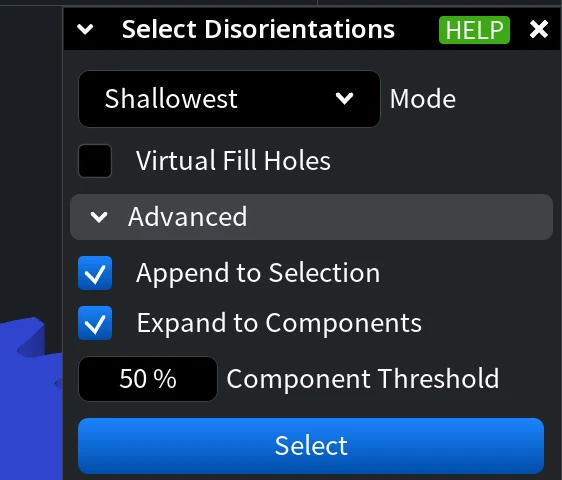
Settings
| Setting | What it does | Default |
|---|---|---|
| Mode | How each triangle is checked. Positive: a ray along the normal must cross the mesh an even number of times. Shallowest: only the direction (along the normal or opposite) with fewer crossings is checked. Both Sides: both directions must have the correct number of crossings (even along the normal, odd opposite). | Shallowest |
| Virtual Fill Holes | Fills the holes of a copy of the mesh for the check, so that rays going out through a hole are counted correctly. The mesh itself does not change. | Off |
| Append to Selection (under Advanced) | Adds the found triangles to the current selection. Turn it off to replace the selection. | On |
| Expand to Components (under Advanced) | Selects a whole connected part if its disoriented area is larger than Component Threshold. | Off |
| Component Threshold (under Advanced) | The share of a part's area that must be disoriented for the whole part to be selected. Shown when Expand to Components is on. | 50 % |
Fix the orientation
- Orient Mesh Normals flips the parts of a mesh that look in the wrong direction, based on the same ray count.
- Flip Normals flips the whole mesh or, for one mesh, its individual parts.
- The Flipped Normals check of Mesh Healer fixes the orientation together with other defects.


